









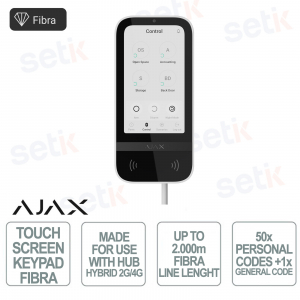
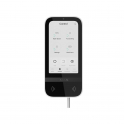
143608.226.WH1 #143608 (ex. 81718.226.WH1) | Ajax Superior KeyPad TouchScreen Fibra bianco è una tastiera cablata Ajax con interfaccia avanzata progettata per il controllo intelligente dei sistemi di sicurezza e automazione, grazie a display touch IPS da 5” ad alta risoluzione e gestione intuitiva degli eventi. Supporta autenticazione multipla tramite Pass, Tag, smartphone e codici, offrendo massima flessibilità di accesso. La tecnologia Fibra con comunicazione criptata fino a 2.000 m garantisce stabilità e sicurezza professionale. Integra notifiche sonore, LED e log eventi direttamente su schermo per un monitoraggio completo. Dotata di protezione antisabotaggio, tamper e funzioni di emergenza, rappresenta una soluzione evoluta per impianti di sicurezza avanzati. Ajax
 SCEGLI PROFESSIONISTA
143608.226.WH1 | TASTIERA CABLATACON TOUCH SCREEN E AUTENTICAZIONE CONTACTLESS

Il Superior KeyPad TouchScreen Fibra, 143608.226.WH1 (ex. 81718.226.WH1), bianco è una tastiera cablata Ajax di nuova generazione con display touch IPS da 5” progettata per il controllo intelligente di sicurezza e automazione. Supporta autenticazione multipla tramite Pass, Tag, smartphone e codici, garantendo accesso rapido e sicuro. La tecnologia Fibra con comunicazione criptata fino a 2.000 m assicura stabilità e affidabilità professionale. Integra notifiche sonore, LED e log eventi direttamente su schermo per un monitoraggio completo del sistema. Dotata di protezione antisabotaggio, tamper e funzioni di emergenza, rappresenta una soluzione evoluta per impianti avanzati.
Specifiche principali:
- Display touch IPS da 5” ad alta risoluzione
- Autenticazione multipla: Pass, Tag, smartphone e codici
- Tecnologia Fibra con comunicazione criptata fino a 2.000 m
- Protezione antisabotaggio con tamper e anti-spoofing
- Gestione eventi e notifiche direttamente su schermo
- Integrazione con sistemi Ajax per sicurezza e automazione
Ulteriori dettagli
Scheda tecnica
| 143608.226.WH1 | |
| Compatibility | |
| Control panels | Hub Hybrid (2G) Hub Hybrid (4G) |
| Communication | |
| Fibra communication technology | Proprietary wired communication technology. Fibra combines the reliability of wires with the freedom of radio connection. Key features:
|
| Line connection | 4-core cable |
| Connection | Superior KeyPad TouchScreen Fibra can be installed after a hub, detector, siren, or other keypad. |
| Radio signal range | Up to 2.000 m up to 6.500 ft Between the detector and a hub (or radio signal range extender) in an open space. |
| Encrypted radio communication | All stored and transmitted data are protected by block encryption featuring a dynamic key. |
| Display | |
| Diagonal | 5" |
| Matrix type | IPS |
| Resolution | 480 × 854 px |
| Sensor | capacitive |
| Brightness settings |
|
| Backlight lifetime | 30,000 hours Guaranteed backlight lifetime when the Always Active Display toggle is enabled. It can be adjusted in Ajax apps and activates only when external power is connected. |
| User interface |
|
| Key features | |
| Panic buttons |
|
| Control |
|
| Contactless access | DESFire® EV1, EV2 ISO14443-А (13.56 MHz) |
| Access codes | up to 50 personal codes One code per each user. The number of personal access codes depends on the hub model 1 keypad code One code per KeyPad |
| Duress codes | up to 50 personal codes One code per each user. The number of personal access codes depends on the hub model 1 keypad code One code per KeyPad |
| Codes for unregistered people | up to 50 personal codes For people who are not registered in the system. The number of such codes depends on the hub model |
| Arming without entering a code | The enabled feature allows the user to arm the system without entering a code or presenting the access device. |
| Group management | Changing the security mode of the groups to which the user has access from the keypad’s display. |
| Scenarios management | A separate keypad tab contains up to 6 buttons, and each one can control one automation device or a group of devices. |
| Indication of malfunctions and security mode |
|
| Fire alarm muting | Turns off the fire detectors alarm, including the interconnected alarm. |
| User pre-authorization | When the feature is enabled, viewing the current system status and control screen is unavailable. For access, the user must pre-authorize: enter a code or present a personal access device to the keypad. |
| Contactless authorization with a smartphone | A smartphone with the installed Ajax app and Bluetooth Low Energy (BLE) support can be used instead of Tag or Pass to authorize a user. BLE is a radio protocol with low power consumption. The keypad supports Android and iOS smartphones with BLE 4.2 and higher. |
| Auto screen wakeup | The keypad wakes up automatically when approaching it. The approaching distance can be adjusted in the app. |
| Remote firmware update | When a new firmware is available, an admin or PRO with the rights to configure the system can run the update in Ajax apps. The keypad must be connected to an external power supply to update the firmware. |
| Recommendations | The device is designed for indoor use only. Please note that the keypad must be connected to an external power supply to update the firmware and keep the screen always active. |
| Sabotage protection | |
| Unauthorized access auto-lock | The keypad locks if an incorrect code is entered or unverified access devices are used more than 3 times in a row within 1 minute. The lock time is adjusted by PRO or user with admin rights in the Ajax app. |
| Tamper alarm | Notifications on attempts to detach the device from the surface or remove it from the mounting panel. |
| Holding screw | To secure the keypad on SmartBracket. |
| Protection against spoofing | device authentication |
| Communication loss detection | after 36 s Detection time depends on the Jeweller or Jeweller/Fibra settings. |
| Power Supply | |
| Fibra line | 7−30 V⎓, up to 54.6 mA The keypad is powered by the control panel. Connect the external power supply for the Always Active Display mode. |
| Backup batteries | 2 × LTO AA Pre-installed. |
| External power supply | 10.5–14 V⎓, from 0.5 A The recommended voltage of the power supply is 12 V⎓. External power supply is not included. It is needed for the Always Active Display mode |
| Enclosure | |
| Color | White |
| Dimension | 171 × 82 × 28 mm 6.74″ × 3.23″ × 1.1″ |
| Weight | 327 g 11.54 oz |
| Operating temperature range | from −10 °C to +40 °C from 14 °F to 104 °F |
| Operating humidity | up to 75% |
| Complete set | Superior KeyPad TouchScreen Fibra SmartBracket mounting panel 2 LTO AA backup batteries (pre-installed) Installation kit Quick start guide |
| Warranty | 24 months |